
Setting a Background Color Image
chiaroscuro —Sat, 02/28/2009 - 04:21
Setting the background color or image of your Fast Dial is one of the most easiest things you can do.
Please choose which version of Fast Dial you are using:
(To find this information, please go to the firefox Addons window (Tools > Addons), the versions is printed to the right of the title)
View Guide for Fast Dial v1.x
1. Open Fast Dial Preferences. (Right click in FD > Preferences)
2. Click the "Appearance" Tab.
3. To set a Background Color, use the "Page" color field.
To set a Background Image, use the "Background Image" Field.

For the background image, you can either enter a URL Address to an image online, or you may click the "..." to browse for images on your computer.
You may click "Clear" when you would like the background image removed from FD.
Note: You may use tiled or pattern backgrounds, they are automatically repeated in both directions.
View Guide for Fast Dial v2.x
1. Open Fast Dial Preferences. (Right click in FD > Preferences)
2. Click the "Appearance" Tab.
3. Choose "Page" from the selection dropdown menu.
4. To set a Background Color, use the "Background" color field.
To set a Background Image, use the "Image" Field.
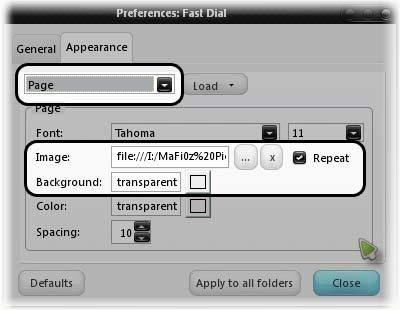
For the background image, you can either enter a URL Address to an image online, or you may click the "..." to browse for images on your computer.
You may click "x" when you would like the background image cleared from FD.
Note: You may use tiled or pattern backgrounds, but you must enable "Repeat".
______________________________
Having trouble with setting a background in FD? Troubleshooting information is available here: Link.
Or, you can get support in the forum here: Link.
- Printer-friendly version
- 0 votes