
Redesign GMail
gumanov —Sun, 07/06/2008 - 15:37
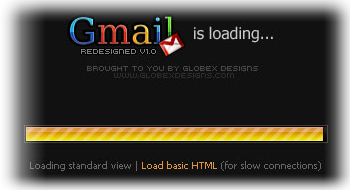


 You can easily make you GMail look like this..
1. Download Stylish Firefox Extension: Link.
2. Restart Firefox.
3. Load this style into stylish: Link.
4. Visit GMail - you're Done!
You can easily make you GMail look like this..
1. Download Stylish Firefox Extension: Link.
2. Restart Firefox.
3. Load this style into stylish: Link.
4. Visit GMail - you're Done!- gumanov's blog
- Log in or register to post comments or vote.
- 4 votes
Comments
Re: Redesign GMail
Submitted by chiaroscuro on Mon, 07/07/2008 - 09:19Thanks for the tip, Mafi0z
GMail Redesigned is quite extraordinary.
I find it looks good also when viewed with Liqube Night loaded into Stylish
But this is probably not to everyone's taste.
I see that Evgueni Naverniouk also answers a question about his working method for writing Styles in Stylish at this location
Re: Redesign GMail
Submitted by Grawl on Wed, 07/09/2008 - 11:54I use "Better Gmail 2" with this skin, stylish is no one )
Re: Redesign GMail
Submitted by chiaroscuro on Fri, 07/18/2008 - 23:52I see there is another Stylish Stylish Gmail Program.
Dark GMail2 Nasa
but not as good as gmail redesigned
Re: Redesign GMail
Submitted by Grawl on Sat, 07/19/2008 - 07:15Nasa..
not, it ont for me.
i use beutiful and ideal "redesigned" )
Re: Redesign GMail
Submitted by ZedoMann on Tue, 06/09/2009 - 13:58Use that now.
Re: Redesign GMail
Submitted by chiaroscuro on Wed, 07/28/2010 - 20:47Gmail redesigned is no longer a style, but has become a Firefox Extension
Please find here:
http://userlogos.org/node/13065
Makes gmail much easier to read...