
Creating iPhone App Style Logos - Fireworks
macleod.mac —Fri, 01/23/2009 - 04:12
Here’s how to make your very own iPhone App style logo::

This tutorial is primarily for canvases 300x225.
Dimensions for 400x300 canvases are in italics
Open Fireworks, then open a new document with the following properties:
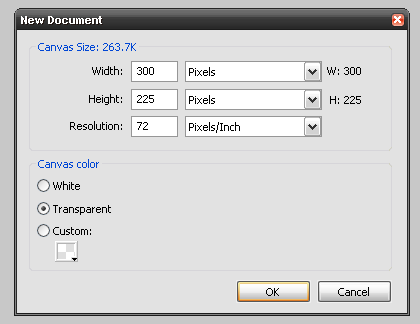
(Or 400x300px)
Draw a standard rounded rectangle, with the following properties:
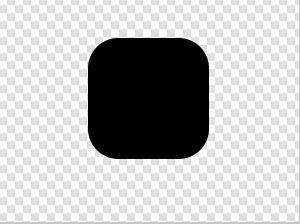
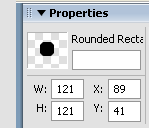
(W:161 H:16 X:118 Y:55)
Select Gradient > Linear.
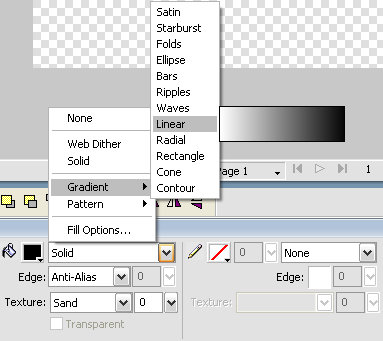
And select the following settings for the gradient:
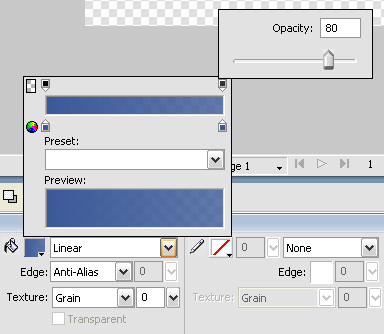
I've used blue as an example, but you can use any colour, but keep it the same along the gradient.
(Same colour throughout / Top opacity 100% Bottom 80%)
Here's how to make the gloss:
Duplicate the layer, by selecting the rectangle, then Ctrl+C then Ctrl+V
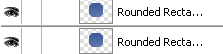
Now an ellipse with the following properties (Don't worry about colour at the moment):
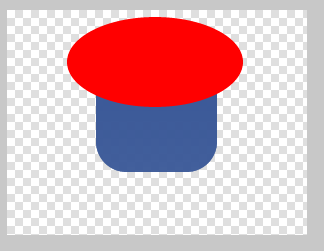
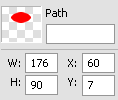
(W:235 H:120 X:80 Y:9)
Select both the duplicated rectangle and the ellipse:
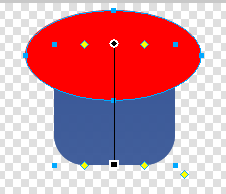
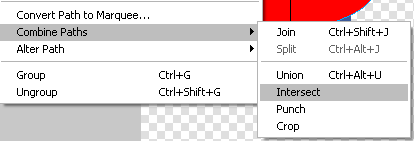
Now select Modify > Combine Paths > Intersect
You should end up with something looking like this:
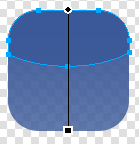
Give the gloss path the following properties – Fill > Solid > White and Opacity 30%

You should now have something that looks like this:

Next, paste the transparent logo you are wanting to make onto the canvas:

Select both the rounded rectangle and your icon for the logo, then hit Ctrl+Alt+2 then Ctrl+Alt+5 to centre it. You should get this:

Then simply add reflection and you’re done!
- Printer-friendly version
- Log in or register to post comments or vote.
- 4 votes
Re: Creating iPhone App Style Logos - Fireworks
Submitted by Mafia_Penguin on Sun, 01/25/2009 - 16:01Nice!
+1, though I can't use it.
Please exchange this coupon for one (1) free internet.
Trouble
using
transparent
Logos?
Click
here
for
help!
Re: Creating iPhone App Style Logos - Fireworks
Submitted by macleod.mac on Sun, 01/25/2009 - 16:05Lol. I'm gonna create a Ps one soon.
And someday I will get round to playing with GIMP...
Thanks.

--
Re: Creating iPhone App Style Logos - Fireworks
Submitted by Mafia_Penguin on Sun, 01/25/2009 - 16:27I'll wait till then!
Please exchange this coupon for one (1) free internet.
Trouble
using
transparent
Logos?
Click
here
for
help!
Re: Creating iPhone App Style Logos - Fireworks
Submitted by sjdvda on Mon, 01/26/2009 - 06:14Great tutorial!!!
+1
I've added a lot of iPhone style logos today.
I've used blue as an example, but you can use any colour, but keep it the same along the gradient.
(Same colour throughout / Top opacity 100% Bottom 80%)
I've noticed that I doesn't look good when using the white color.
I used a slight gray color for the bottom part.
sjdvda

Re: Creating iPhone App Style Logos - Fireworks
Submitted by spucelik on Wed, 08/12/2009 - 22:09Is there anything special I need to do to save the image once I create it? I'm trying to create an icon for the tab bar and it's not displaying. The file type in Finder (Mac) is FIreworks PNG file and not a straight PNG file which is why I think I'm not saving or exporting it correctly.
Thanks
Re: Creating iPhone App Style Logos - Fireworks
Submitted by macleod.mac on Thu, 08/13/2009 - 11:01Fireworks PNGs should display the same as normal PNGs, with the added bonus that they are editable, which is why I fundamentally prefer Fw to other web image editing softwares.
~macleod.mac
Click Here to Request a Logo / Just ask if you want one of my source PNGs
Re: Creating iPhone App Style Logos - Fireworks
Submitted by JFlemming on Mon, 08/31/2009 - 10:14Great tutorial mate! I don't think fireworks gets as much justice as it should when it comes to graphic design. It's good to see some variety in the tutorials of different graphic programs!