
Rounder Fast Dial Cells - CSS Edit
gumanov —Wed, 06/25/2008 - 14:40
Note: For the rounder corners to work properly, transparent logos must be used, thus firefox 3 is required! (Thanks to chiaroscuro for pointing this out.)
_____________________
Hi again..
After doing my tutorial on transparent logos...
i thought i'd also make one for editing the radius of the Fast Dial box corners.
Confusing description? Heres an image of what im actually talking about:
Here it is EDITED vs ORIGINAL:

 Now do you see the difference?
To get yours to do the same you must do the Following:
1. Find you FireFox Profile Folder.
This folder is located In:
_________________________
Windows 2000, XP, or Vista:
Vista - C:\Users\
Now do you see the difference?
To get yours to do the same you must do the Following:
1. Find you FireFox Profile Folder.
This folder is located In:
_________________________
Windows 2000, XP, or Vista:
Vista - C:\Users\\AppData\Roaming\Mozilla\Firefox\Profiles\
XP or 2000 - C:\Documents and Settings\(USER)\Application Data\Mozilla\Firefox\Profiles\
Quick Shortcut - Click Start > Run, Type: %APPDATA%\Mozilla\Firefox\Profiles\
_________________________
Windows 98, ME:
C:\WINDOWS\Application Data\Mozilla\Firefox\Profiles\
_________________________
Linux:
~/.mozilla/firefox/
.mozilla is a hidden folder (View > Show Hidden Files)
_________________________
Mac:
~/Library/Application Support/Firefox/Profiles/
_________________________
Heres an image of my firefox profile location (WinXP):
(Click to enlarge)
 2. Enter your Profile (open the folder that has the weird name)
3. In your profile folder go to:
extensions\fastdial@telega.phpnet.us\chrome\content\themes\default
4. In this "default" folder you will find a file named "template"
Right click it > Open With.. > Open it with NOTEPAD
5. Now look for this code:
2. Enter your Profile (open the folder that has the weird name)
3. In your profile folder go to:
extensions\fastdial@telega.phpnet.us\chrome\content\themes\default
4. In this "default" folder you will find a file named "template"
Right click it > Open With.. > Open it with NOTEPAD
5. Now look for this code:
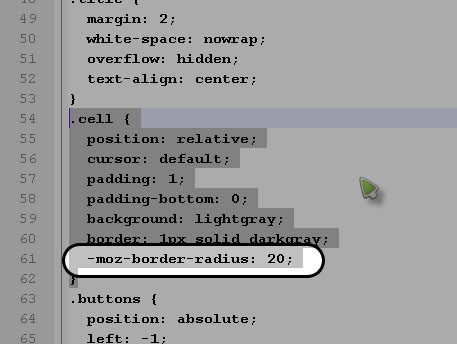 And change the value of "-moz-border-radius" to something around 20
Save the file, and (re)start Firefox
And change the value of "-moz-border-radius" to something around 20
Save the file, and (re)start Firefox
Now do you see the difference?
To get yours to do the same you must do the Following:
1. Find you FireFox Profile Folder.
This folder is located In:
_________________________
Windows 2000, XP, or Vista:
Vista - C:\Users\ 2. Enter your Profile (open the folder that has the weird name)
3. In your profile folder go to:
extensions\fastdial@telega.phpnet.us\chrome\content\themes\default
4. In this "default" folder you will find a file named "template"
Right click it > Open With.. > Open it with NOTEPAD
5. Now look for this code:
And change the value of "-moz-border-radius" to something around 20
Save the file, and (re)start Firefox
2. Enter your Profile (open the folder that has the weird name)
3. In your profile folder go to:
extensions\fastdial@telega.phpnet.us\chrome\content\themes\default
4. In this "default" folder you will find a file named "template"
Right click it > Open With.. > Open it with NOTEPAD
5. Now look for this code:
And change the value of "-moz-border-radius" to something around 20
Save the file, and (re)start Firefox- Printer-friendly version
- 2 votes