Simple Mail

Simple Mail [v2.90]
Welcome to the Simple Mail Home Page!
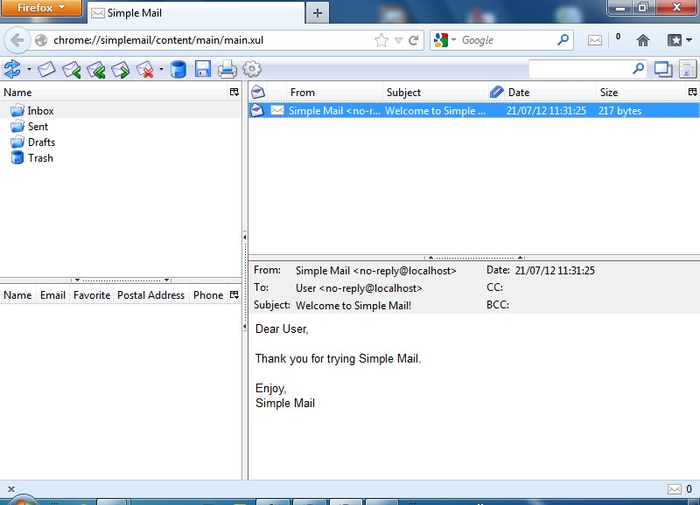
Simple Mail is a mail client for Firefox. It allows you to get notified, read and write messages for multiple email accounts inside Firefox.
Usage: Configure one or more accounts in Preferences, set account refresh time and get notified of new mail. When new mail arrives, Simple Mail shows new messages count in status bar. You can click Simple Mail icon to open received messages in a separate browser tab. Also Simple Mail has a toolbar button, which you can put on toolbar to access SM easily.
Features:
- Accounts
- Multiple email accounts
- POP3/IMAP/SMTP protocols
- Automatic checking on specified timeout
- Address Book
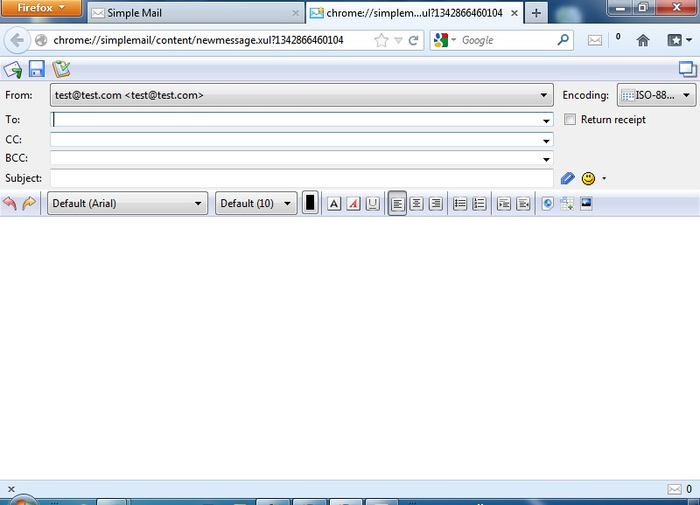
- Autocomplete box suggests recipient names/addresses as you start typing them
- Groups of contacts
- Display Address book in main Simple Mail window
- Folders
- Create custom folders
- Drag-n-drop folders and messages into folders
- Use filters to automatically sort incoming messages into folders
- New message composition
- WYSIWYG editor. Customize font/color of your message
- Smiles. Use predefined smiles or easily add your own
- URLs are automatically converted to hyperlinks as you type them
- Appearance
- Right-click on toolbar to choose "icons/text/icons and text" mode
- Additional columns for folders can be turned on (unread/total/size)
- Switch window layout by clicking on an icon in the top-right corner
- Other
- Store your mailbox on a Flash drive
- Sort messages by clicking on column headers
Filters: Use filters to automatically dispose incoming messages. Each filter consists of a set of rules and a set of actions. Rules are matched against incoming message properties and on success actions are executed. You can use filters to:
- Move messages of different accounts into different folders
- Turn on "Download headers only" mode and create a filter to fully download messages only from contacts in your address book
- Mark important messages with red color
- Play different sounds for messages from different senders


- 2 votes
| Attachment | Size |
|---|---|
 simple_mail-2.87-fx.xpi simple_mail-2.87-fx.xpi | 622.93 KB |
Archived - Simple Mail ChangeLog
V2.90
V2.89
V2.88
V2.87
WARNING : This version is not compatible with Firefox versions below 31
V2.86.8.1
WARNING : This version is not compatible with Firefox versions below 31
V2.86.8
WARNING : This version is not compatible with Firefox versions below 31
V2.86.7
WARNING : This version is not compatible with Firefox versions below 31
WARNING : This version is not compatible with Firefox versions below 16
WARNING : This version is not compatible with Firefox versions below 14
V2.86.4
WARNING : This version is not compatible with Firefox versions below 14
V2.86.3
WARNING : This version is not compatible with Firefox versions below 14
V2.86Beta6
WARNING : This version is not compatible with Firefox versions below 14
V2.86Beta5
WARNING : This version is not compatible with Firefox versions below 14
V2.86Beta1
V2.85.0
V2.84.3Beta1
V2.84
V2.83.3
V2.83.2
V2.83.1
V2.83
V2.82
V2.81
V2.81Beta8
V2.81Beta7
V2.81Beta6
V2.81Beta5
V2.81Beta4
V2.81Beta3
V2.80.2
V2.81Beta2
V2.81Beta1
V2.80.1
V2.80
V2.80Beta4
V2.80Beta3
V2.80Beta2
V2.80Beta
V2.78
V2.77
- ADD : Option for blocking multimedia content in mail (switch in main tool-bar)
- ADD : Internal colorpicker for filter-action and text color for email messages
- ADD : Show alert when sqlite VACUUM is finished
- FIX : Preferences dialog can't close
- FIX : Icons style don't changed without reopen SM
- FIX : Welcome letter
- FIX : Can't delete mails from server (sometimes)
- FIX : Attachment icon not showed in saved to html mails
- UPD : Locales updated
- UPD : Preferences redesigned
V2.89
- ADD : Auto-config for accounts (predefined settings for many email servers)
- ADD : Filter rule for mails marked read\unread
- FIX : Backward compatibility for Firefox >= 16 (experimental)
- FIX : Can't get host name (Not Roman alphabet in host name)
- FIX : Can't apply filters without restart
- FIX : Error when add new address
- FIX : Folder disappear when drag and drop
- UPD : Many internal changes (something may be broken)
- UPD : Account set-up is totally changed
- UPD : Locales updated
V2.88
- FIX : Backward compatibility for Firefox >= 24 (experimental)
- FIX : No icon in status-bar
- FIX : No icons in status-bar pop-up menu
- FIX : Some locales fixes
- FIX : Can't modify rules in filters (sometimes)
- FIX : Can't apply filters now (sometimes)
- FIX : Very slow messages moving to folder
- FIX : Very slow deletes messages
- ADD : Added item "open in a new tab" to messages-list pop-up menu
- ADD : Added item "open in a window tab" to pop-up menu
- ADD : Added button "toggle read" to main tool-bar
- ADD : Make "mailto:" URLs (un)handled by SM now is optionality
- UPD : Many internal changes (something may be broken)
- UPD : Selected message immediately showed (when keyboard used)
- UPD : Was removed some obsolete code
- UPD : Locales updated
V2.87
WARNING : This version is not compatible with Firefox versions below 31
- UPD : Many internal changes (something may be broken)
- UPD : Various minor bugs
- UPD : ru-RU locale
- FIX : Can't modify action in filters by mouse double click
- FIX : Can't apply filters now (sometimes)
- FIX : Can't refresh mail from pop-up menu in main form
V2.86.8.1
WARNING : This version is not compatible with Firefox versions below 31
- UPD : Various minor bugs
- FIX : Can't modify address-book sometimes
V2.86.8
WARNING : This version is not compatible with Firefox versions below 31
- FIX : Compatibility with Firefox 45
- FIX : Can't send\receive mails
- FIX : Can't add\modify accounts
- FIX : Can't add\modify items in address-book
- FIX : Can't change font in message editor
- FIX : Infinity adding duplicate of selected font in font-selector
- FIX : ru-RU locale has wrong text in plaintextOnReceive
- ADD : Icons for pop-up menu
V2.86.7
WARNING : This version is not compatible with Firefox versions below 31
- FIX : Progress Meter stay after sent
- FIX : Compatibility with Firefox 31-32
- FIX : The search is performed on the fields to, from, cc and bcc
WARNING : This version is not compatible with Firefox versions below 16
- ADD : DTD declaration on saved mail
- FIX : Problem when choosing font for new mail
- FIX : Various little bugs
- FIX : Pop-up position under FX29
- FIX : Settings window size
- ADD : New skin
WARNING : This version is not compatible with Firefox versions below 14
- ADD : Option to hide completely status-bar icon
V2.86.4
WARNING : This version is not compatible with Firefox versions below 14
- - MODIFIED : The option to delete mails on receive when using a IMAP server is no longer available (This is not an IMAP feature)
- ADD : Option to set pop-up alerts always on top
- FIX : Classic pop-up close after 4 secs
- ADD : hu-HU locale (Gabesz)
V2.86.3
WARNING : This version is not compatible with Firefox versions below 14
- FIX : File permissions under Linux
- FIX : Sent Popup popup is not displayed if new message is in a new window
- FIX : Import .eml problem
- FIX : Problem on addresses with "Reply All"
- FIX : Unable to import mail file up to 100 Mb
- FIX : Problem with "Send by SimpleMail" option in drop down menu
- FIX : Problem with colors
- ADD : Option to open mail in a new window
- ADD : Option to open mail in a new tab
- ADD : SMTP Authentication
- ADD : ro-RO locale (alinbeg)
- ADD : Option to clean Database on exit
- UPD : some CSS improve
- UPD : Plain-text view
V2.86Beta6
WARNING : This version is not compatible with Firefox versions below 14
- ADD : Option to clean Database on exit
- FIX : change in export js code
V2.86Beta5
WARNING : This version is not compatible with Firefox versions below 14
- FIX : Minor bugs
- FIX : Problem on addresses with "Reply All"
- FIX : Unable to import mail file up to 100 Mb
- ADD : Option to open mail in a new window
- ADD : Option to open mail in a new tab
- ADD : SMTP Authentication
- UPD : Plain-text view
- FIX : Problem with colors
- FIX : Problem with "Send by SimpleMail" option in drop down menu
- ADD : ro-RO locale (alinbeg)
V2.86Beta1
- FIX : Problem on addresses with "Reply All"
- ADD : Option to open mail in a new window
- ADD : Option to open mail in a new tab
- ADD : SMTP Authentication
- UPD : Plain-text view
- UPD : Various minor bugs
V2.85.0
- ADD : Firefox 22 compatibility
- FIX : Problem with STARTTLS
- FIX : Problem on filter when use exclusion
- FIX : Unable to send mail over 800 Kb
- FIX : Problem with attachment's name with ' or [
- FIX : Bug on Signature in Plain Text
- FIX : Various bugs under the hood
- FIX : Shift+del work again
- ADD : Scroll in mail with Up and Down arrows
- ADD : Sort direction for AddresssBook
- ADD : Option to disable alert send/received emails in Plain text
- ADD : View size of attachments files
- ADD : Scroll on long messages with arrow keys
- ADD : You can mark a Mail as SPAM/NO SPAM by drag and drop in/out the SPAM Folder
- ADD : Option to enable log file (in the operating system's temporary files directory (for example, /tmp on Mac OS X and Linux, c:\windows\temp on Windows)).
V2.84.3Beta1
- FIX : Problem on filter when use exclusion
- FIX : Unable to send mail over 800 Kb
- FIX : Problem with attachment's name with ' or [
- FIX : Bug on Signature in Plain Text
- FIX : various bugs under the hood
- ADD : Sort direction for AddresssBook
- ADD : Option to disable alert send/received emails in Plain text
- ADD : View size of attachments files
- ADD : Scroll on long messages with arrow keys
- ADD : You can mark a Mail as SPAM/NO SPAM by drag and drop in/out the SPAM Folder
- FIX : Bug with Spam management
- FIX : Refreshing mail :
- -1 : No automatic refresh and no refresh clicking on refresh button, refresh only by clicking on account name
- 0 : No automatic refresh but refresh when clicking on refresh button and on account name
- +10, +20 : Automatic refresh, when clicking on refresh button and on account name
- ADD : Now, you can't add two addresses with the same email in the address book
- FIX : Attach multiples files don't work
- ADD : Popup when you send a mail
- ADD : After send return to the SimpleMail window if multiples tabs
- FIX : Bug with acknowledgements
- FIX : Problem in mails headers
V2.84
- ADD : New attachments display
- FIX : Progress bar don't update
- ADD : "Refresh Every" option for account with zero fill in, set manual check account
- ADD : Attachments are automatically placed at the end of the email when composing
- ADD : Option to display/don't display remote images in mails
- ADD : Sound notification
V2.83.3
- FIX : Compatibility with Firefox 17
- FIX : Bug in mail format
- FIX : "Hide counter toolbar when there's no mail" won't work
- ADD : Option for date format
- ADD (again again) : You can select a mail with right-click for deleting (or something else) without opening it (code re-rewrite...)
- ADD : Add simplemail's button on first install
V2.83.2
- FIX : Bug with acknowledgements
- FIX : Add a signature if you reopen a template
- ADD : New filter to auto forward mails
- ADD : Some cosmetic changes
- ADD : Check and send progress bar in the toolbar
- ADD (again) : You can select a mail with right-click for deleting (or something else) without opening it (code rewrite)
- ADD : Check mail in the background if SimpleMail tab is not focused
V2.83.1
- FIX : Problem sending some email
- FIX : Filters are movable again
- FIX : Auto sync don't work
V2.83
- ADD : Option to empty trash on exit
- ADD : Possibility to abort sending/checking mail
- ADD : Change icon when RE or FWD
- ADD : Add Lithuanian language
- ADD : Add Catalan language
- ADD : Add Japanese language
- ADD : Add Ukrainian language (thanks to Daniel Guerin)
- FIX : Mailto handler work now (thanks to Vaka)
- ADD : Option to open new mail in a new window
- FIX : SPAM Management don't work correctly - code rewrite
- FIX : Problem with email name with coma
- FIX : Space on the left of Simple Mail's button
- ADD : Option to avoid confirmation of deleting messages
V2.82
- FIX : Problem with import/export of Adressbook
- - REMOVED : "you can select a mail with right-click for deleting without opening it" coz peoples don't like it
V2.81
- - Same as Beta8
V2.81Beta8
- ADD : Simple SPAM Management
- FIX : Some cosmetic changes
V2.81Beta7
- ADD : Postal address and phone in AdressBook
V2.81Beta6
- FIX : Now work with Yahoo IMAP
- FIX : Problem with duplicate signature
V2.81Beta5
- ADD : New icons Oxygen by David Vignoni
- FIX : Mark as read option with zero fill in mark email as read immediatly
- FIX : Options windows won't close if open without the Simple Mail main window open (aka under add-ons page)
- FIX : Problems with "Email not found on the server"
- ADD : Management of acknowledgements
- ADD : Filter work on messages already received
V2.81Beta4
- ADD : Support of SMTP Authentication (STARTTLS)
V2.81Beta3
- FIX : You can't receive email with IMAP under Firefox 7
V2.80.2
- FIX : You can't receive email with IMAP under Firefox 7
V2.81Beta2
- ADD : You can now send AND/OR view mails in plain-text
V2.81Beta1
- ADD : You can select a mail with right-click for deleting without opening it
V2.80.1
- FIX : Error on Polish locale
- FIX : Multiple bugs in the V2.80
V2.80
- Same as V2.80Beta4
V2.80Beta4
- FIX : Choice for delete mails on server won't work correctly
- FIX : Transparent Popup should work under Linux
- FIX : Unable to send mail with pictures > 500Ko, Pdf > 1 Mo, Zip > 1Mo
- UPD : Locales
V2.80Beta3
- UPD : da locale
- ADD : sv-SE locale
- ADD : Hide counter on toolbar when there is no mails
- ADD : You can switch icons style between old and new
V2.80Beta2
- FIX : Error message related to some locales
- UPD : cs-CZ locale
- ADD : hy-AM locale
V2.80Beta
- FIX : Drag'n'drop files on message window work again
- ADD : Button for insert image in the message body
- ADD : Column read / unread with sort direction
- ADD : Show email counter as in status-bar, in button toolbar
- ADD : Transparent (only for windows), normal or classic Popup message
- ADD : Custom popup message timeout
- ADD : Export function now export messages in sub-folders
- ADD : New function Archive : you can archives your mails in a file (it can be put in the Thunderbird mail folder to be opened), a Zip file, or in an archive folder in Simplemail. You can archive all your mails (associated with a account) or only mails in a specified folder or mails before a date.
- FIX : Crash when you change folder or view mails
V2.78
- Code update
V2.77
- FIX : Attachments can now be opened
- FIX : You can add your own smiley's
- FIX : Auto-complete in the To: Cc: and BCc: fields work again
- - New icons (Nuvola by David Vignoni) : feel free to said if you hate or love !!
- 4 votes